
See the patterns.
Watch the shots.
Tag shots in your own match video. See your save percentage and shot maps. Click a number to watch the shot. Your video stays on your computer.
Tag shots in your own match video. See your save percentage and shot maps. Click a number to watch the shot. Your video stays on your computer.
Then €19 a month or €190 a year. Card required, cancel any time.
Pick the shooter
Saint-Raphaël Var Handballclicks to log a shot: shooter, court, goal, result
clicks to log a shot: shooter, court, goal, result
Stats views, from the season overview to every shooter you faced
Stats views, from the season overview to every shooter you faced
real shots behind the expected saves in the Markis rating
real shots behind the expected saves in the Markis rating
languages: English, Deutsch, Français, Español and العربية
languages: English, Deutsch, Français, Español and العربية
Inside the analyser
Inside the analyser
Find what the numbers mean.
See where shots go, how hard they are to save and what each shooter does.
See where shots go, how hard they are to save and what each shooter does.
Click a stat. Watch the video.
Go straight from any stat to the matching action. Review the moment immediately, without searching through the match.
See where goals go in.
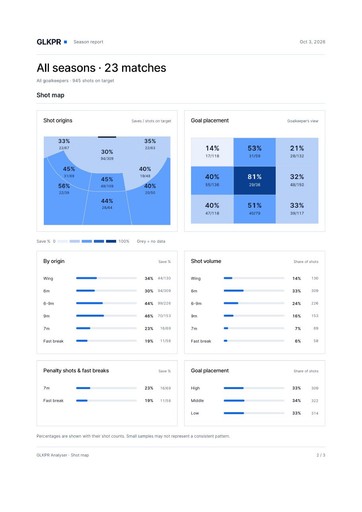
Nine goal zones show where saves happen and goals get through, from the goalkeeper’s view.
Rate the performance, not just the saves.
Developed from my coaching experience, the Markis rating compares saves with the difficulty of the shots faced.
Read the shooter.
See who shoots, where they aim and how your goalkeeper performs against them across matches.
Show what you mean.
Draw arrows, circles and lines on the video to make your feedback clear.
Log only what you need.
Full analysis, clips only or stats without video. Choose the detail your review needs.
4 choices per shot, and the clip saves itself
Open your video. Start analysing.
Play matches straight from your computer. No upload to wait for.
Clear reports. Ready to share.
Bring the numbers, shot maps and shooter breakdowns together in a clear, printable report.


Five languages. Throughout.
English, German, French, Spanish and Arabic—across menus, tutorials and reports.
Names and notes stay exactly as you typed them.
Click a stat. Watch the video.
Go straight from any stat to the matching action. Review the moment immediately, without searching through the match.
See where goals go in.
Nine goal zones show where saves happen and goals get through, from the goalkeeper’s view.
Rate the performance, not just the saves.
Developed from my coaching experience, the Markis rating compares saves with the difficulty of the shots faced.
Read the shooter.
See who shoots, where they aim and how your goalkeeper performs against them across matches.
Show what you mean.
Draw arrows, circles and lines on the video to make your feedback clear.
Log only what you need.
Full analysis, clips only or stats without video. Choose the detail your review needs.
4 choices per shot, and the clip saves itself
Open your video. Start analysing.
Play matches straight from your computer. No upload to wait for.
Clear reports. Ready to share.
Bring the numbers, shot maps and shooter breakdowns together in a clear, printable report.
Five languages. Throughout.
English, German, French, Spanish and Arabic—across menus, tutorials and reports.
Names and notes stay exactly as you typed them.
Easy from the first match
Easy from the first match
Spend less time logging.
Save team lists. Use keyboard shortcuts. Follow the guide as you go.
Save team lists. Use keyboard shortcuts. Follow the guide as you go.
Keyboard shortcuts
Log a shot in two keys.
A, S and D set the result, Enter logs the shot. Change the keys to suit you.
A, S and D set the result, Enter logs the shot. Change the keys to suit you.
Guided tutorial
Learn on a demo match.
A step-by-step tour on a demo match, so your first real one goes quickly.
A step-by-step tour on a demo match, so your first real one goes quickly.
Teams and rosters
Set up once, reuse.
Set up clubs, keepers and shooters once and reuse them every match.
Set up clubs, keepers and shooters once and reuse them every match.
Undo and edit
Fix any tag later.
Change any tag later: the marker, the result or the shooter.
Change any tag later: the marker, the result or the shooter.
Clip exports
One highlight reel, or a separate video for each player, cut from your own footage.
One highlight reel, or a separate video for each player, cut from your own footage.
CSV and backups
Take the shot data into your own analysis, and back up everything to move browsers.
Take the shot data into your own analysis, and back up everything to move browsers.
Scouting matches
Log an opponent’s match without one of your keepers in goal.
Log an opponent’s match without one of your keepers in goal.
Light and dark
Two themes and six map colour sets, in the app and in the reports.
Two themes and six map colour sets, in the app and in the reports.
“A save percentage tells you how many shots you stopped.
“A save percentage tells you how many shots you stopped.
“A save percentage tells you how many shots you stopped.
The video helps you understand why.”
The video helps you understand why.”
The video helps you understand why.”

Marko Markiš
·
Goalkeeper coach, founder of GLKPR
Pricing
Pricing
One plan. Start with your next match.
Seven days free with every feature. Then pay monthly, or yearly and get two months free.
Seven days free with every feature. Then pay monthly, or yearly and get two months free.
Free trial
€0
for 7 days
Try everything on your own matches.

Every feature, nothing locked
Your own matches and video
Keys, clips, reports and exports
Card required, cancel any time
Then €19 a month, cancel before the 7 days end.
Analyser
€19
/ month
For coaches and keepers who log every match.
Unlimited matches, keepers and shots
All six Stats views and the Markis rating
Clips, season reports, CSV and backups
Five languages, light and dark
Your video stays on your computer
Billed monthly. Switch to yearly any time.
Card required for the trial. Cancel any time.
Already a member? Open the analyser
Your questions,
answered.

Need help?
Find your next step in a free 15-minute call.
What am I subscribing to?
The GLKPR Analyser in your browser: shot logging, the six Stats views, the Markis rating, matches and players, clip review, drawing and exports. Use it on your computer at app.glkpr.com.
Do I need to upload my video?
No. Your video files stay on your computer and play from there. Keep the original footage so you can play and export clips.
Can I log a match without video?
Yes. Stats only mode lets you log shots from the bench or from your notes. To watch or export clips you need the match video.
Which languages does it speak?
English, German, French, Spanish and Arabic, with a right-to-left layout for Arabic. Switch in Settings at any time. Your own names and notes stay as you typed them.
What is the Markis rating?
A 1–10 performance rating developed from Marko Markiš’s coaching experience. It compares your saves with expected saves based on shot origin, placement and the defence. A 6.5 is par. You see how you performed against the shots you actually faced.
Which browser should I use?
Chrome or Edge on a computer work best, and you need one of them to open a whole folder of videos. Single video files work in any modern browser.
How do I keep or move my analysis?
Save a backup and restore it in another browser. Keep your videos separately and link them again for playback. Videos are not part of the backup.
Your questions,
answered.
What am I subscribing to?
The GLKPR Analyser in your browser: shot logging, the six Stats views, the Markis rating, matches and players, clip review, drawing and exports. Use it on your computer at app.glkpr.com.
Do I need to upload my video?
No. Your video files stay on your computer and play from there. Keep the original footage so you can play and export clips.
Can I log a match without video?
Yes. Stats only mode lets you log shots from the bench or from your notes. To watch or export clips you need the match video.
Which languages does it speak?
English, German, French, Spanish and Arabic, with a right-to-left layout for Arabic. Switch in Settings at any time. Your own names and notes stay as you typed them.
What is the Markis rating?
A 1–10 performance rating developed from Marko Markiš’s coaching experience. It compares your saves with expected saves based on shot origin, placement and the defence. A 6.5 is par. You see how you performed against the shots you actually faced.
Which browser should I use?
Chrome or Edge on a computer work best, and you need one of them to open a whole folder of videos. Single video files work in any modern browser.
How do I keep or move my analysis?
Save a backup and restore it in another browser. Keep your videos separately and link them again for playback. Videos are not part of the backup.
Your questions,
answered.
Need help?
Find your next step in a free 15-minute call.
What am I subscribing to?
The GLKPR Analyser in your browser: shot logging, the six Stats views, the Markis rating, matches and players, clip review, drawing and exports. Use it on your computer at app.glkpr.com.
Do I need to upload my video?
No. Your video files stay on your computer and play from there. Keep the original footage so you can play and export clips.
Can I log a match without video?
Yes. Stats only mode lets you log shots from the bench or from your notes. To watch or export clips you need the match video.
Which languages does it speak?
English, German, French, Spanish and Arabic, with a right-to-left layout for Arabic. Switch in Settings at any time. Your own names and notes stay as you typed them.
What is the Markis rating?
A 1–10 performance rating developed from Marko Markiš’s coaching experience. It compares your saves with expected saves based on shot origin, placement and the defence. A 6.5 is par. You see how you performed against the shots you actually faced.
Which browser should I use?
Chrome or Edge on a computer work best, and you need one of them to open a whole folder of videos. Single video files work in any modern browser.
How do I keep or move my analysis?
Save a backup and restore it in another browser. Keep your videos separately and link them again for playback. Videos are not part of the backup.
Log tonight’s match.
Train what it shows tomorrow.
1
Create your account
2
Open a match video
3
Log your first shot
Seven days free, then €19 a month or €190 a year. Your video never leaves your computer.